Your browser does not seem to support JavaScript. As a result, your viewing experience will be diminished, and you have been placed in read-only mode.
Please download a browser that supports JavaScript, or enable it if it's disabled (i.e. NoScript).
更新了快书16.03.68版本,资料库菜单变了,使用起来比之前好用,但是不知道在哪里传资料了 不知道哪位伙伴知道怎么传资料呀。
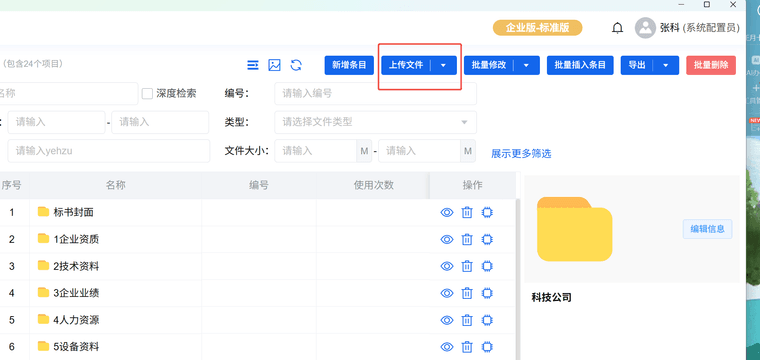
您好,素材库更新之后上传页面统一在:管理-素材库-素材管理页面进行上传。 1、点击需要上传的素材板块,然后点击上传文件按钮。 2、上传单个文件,选择“上传文件”按钮;上传多个文件,选择“批量上传文件”按钮;以压缩包(ZIP)形式上传,选择“上传文件夹”按钮。

 不知道哪位伙伴知道怎么传资料呀。